Every salesperson knows the grind: hours spent Googling businesses, clicking through websites hunting for email addresses, copy-pasting into spreadsheets. By the time you've built a list of 50 leads, half your day is gone — and you haven't made a single call.
What if you could find 200 businesses, enrich them with verified emails and social profiles, and generate personalized sales strategies — all before your morning coffee gets cold?
Email Lead Scraper makes that possible. This is the tool I wish existed when I was doing cold outreach. Now it does.
Tech Stack
The $10,000 Problem
Let me paint a picture of B2B prospecting in 2024:
The Manual Way:
- Google "restaurants in Amsterdam" — 10 minutes browsing results
- Visit each website, hunt for the contact page — 3 minutes per business
- Copy email addresses into a spreadsheet — 1 minute per business
- Research the business for personalization — 5 minutes per business
- Write a cold email that doesn't sound like spam — 10 minutes per business
That's 19 minutes per lead. A list of 100 leads? 32 hours of work.
Sales teams burn 40% of their time on this. Marketing agencies charge clients $2,000 for "research" that's mostly copy-paste work. Freelancers skip prospecting entirely because it's too painful — and wonder why they don't have enough clients.
The Email Lead Scraper Way:
- Enter location and industry — 10 seconds
- Click "Super Search" — results stream in real-time
- Click "Enrich All" — emails and socials extracted automatically
- Click "Generate Sales Plan" — AI writes personalized outreach
That's 3 minutes for 100+ leads. With emails. With social profiles. With personalized sales strategies.
The math is simple: if your time is worth $50/hour, Email Lead Scraper pays for itself in the first search.
The Dashboard: Your Command Center
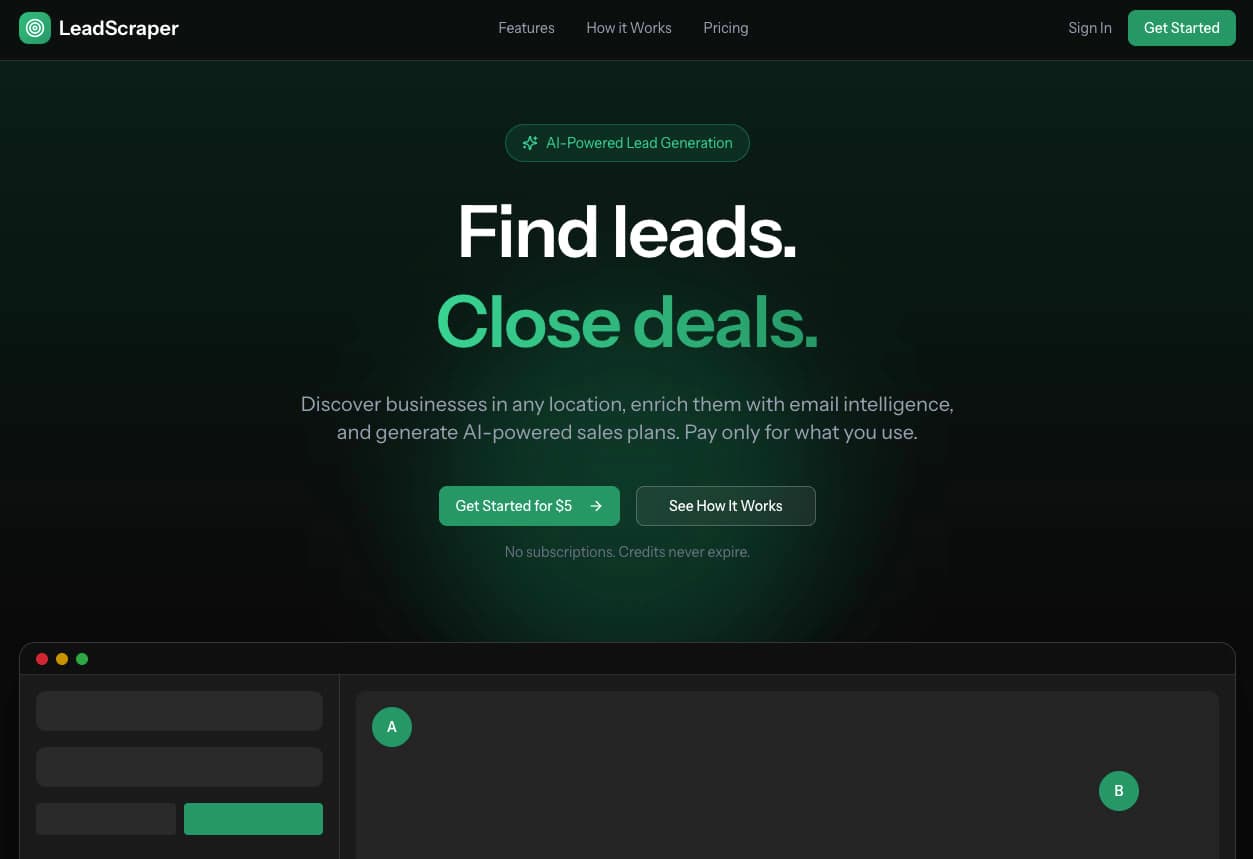
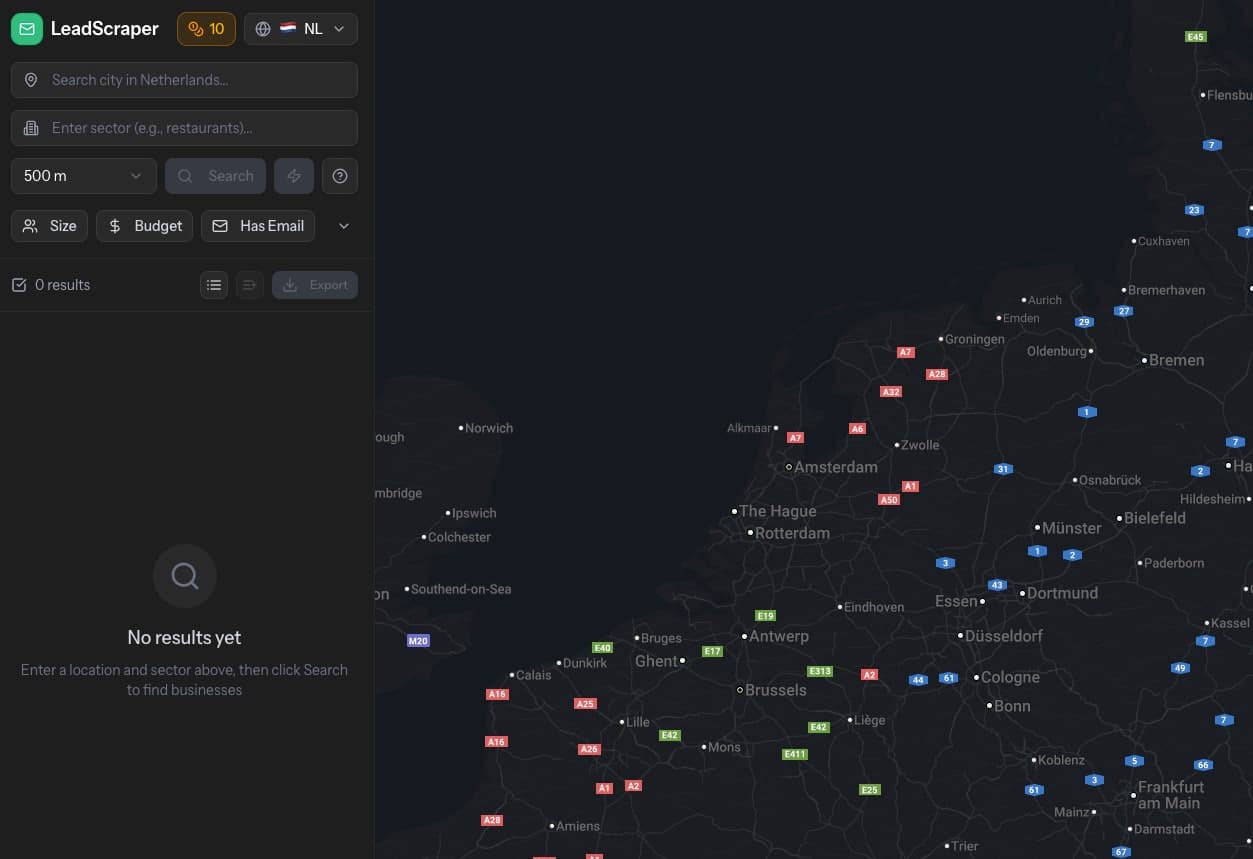
The dashboard is where the magic happens. Every feature is accessible from a single screen — no clicking through menus, no context switching.
Left Panel: Search Controls
- Location autocomplete powered by Google Places
- Industry/sector dropdown with 50+ categories
- Radius slider (0.5km to 50km)
- Toggle between Standard and Super Search
Center: Results Grid
- Business cards with name, rating, review count
- Contact information at a glance
- Enrichment status indicators
- Quick actions: enrich, save, generate plan
Right Panel: Interactive Map
- Google Maps with custom markers
- Click any marker to highlight the business
- Visual clustering for dense areas
- Real-time updates as results stream in
Bottom: Lead Lists Sidebar
- Collapsible panel for organization
- Categories and lists at your fingertips
- Drag-and-drop would be nice (it's on the roadmap)
Super Search: The Algorithm That Changes Everything
Here's a dirty secret about Google Places API: it caps results at 20 businesses per search.
Search "cafes in Rotterdam" and you get 20 results. There are 500+ cafes in Rotterdam. Google just... doesn't show them.
Most lead generation tools accept this limitation. "Here's 20 leads, good luck!"
Email Lead Scraper breaks through the limit.
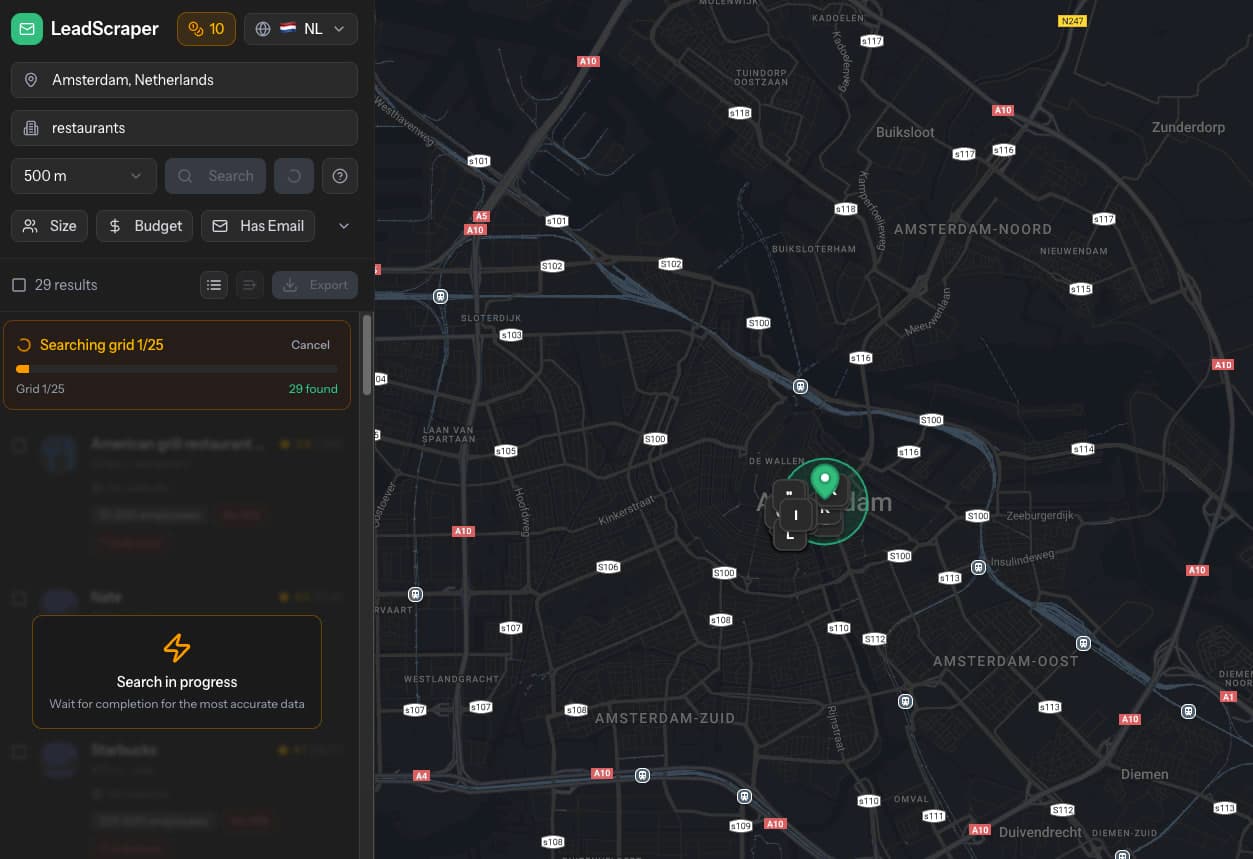
Super Search uses a grid-based algorithm:
- Grid Generation — Divides your search radius into overlapping hexagonal cells using the haversine formula for geographic accuracy
- Parallel Queries — Each cell queries Google Places independently
- Real-Time Streaming — Results arrive via Server-Sent Events, updating the UI instantly
- Smart Deduplication — Businesses appearing in multiple cells are merged automatically
- Progress Tracking — Watch the grid fill in as searches complete
The numbers:
- 2km radius → ~15 grid cells → 150-200 unique businesses
- 5km radius → ~40 grid cells → 400-500 unique businesses
- 10km radius → ~80 grid cells → 800+ unique businesses
This is the difference between "a few leads to call" and "every business in the area."
The Interactive Map
Data in a spreadsheet is useful. Data on a map is powerful.
The interactive map shows every search result as a custom marker. Clusters automatically form in dense areas. Click any marker to:
- Highlight the business in the results grid
- See a preview card with key details
- Quick-enrich directly from the map
- Open in Google Maps for directions
For local service businesses — plumbers, restaurants, retail stores — geographic context matters. You can visually identify business districts, spot competitors clustering together, and plan route-optimized outreach.
The map updates in real-time during Super Search. Watch your target area fill with opportunities.

Enrichment: From Name to Full Profile
Finding businesses is step one. Finding their contact information is where most tools fail.
Email Lead Scraper's enrichment pipeline is the result of months of iteration:
Email Extraction
Primary Method: Direct Scraping
- Fetches the business website (homepage + /contact + /about)
- Parses HTML for email patterns
- Runs comprehensive regex with false-positive filtering
- Excludes generic addresses:
noreply@,support@wordpress.com,example@
Fallback Method: Browsershot Rendering
- For JavaScript-heavy sites (React, Vue, Angular)
- Puppeteer renders the page fully before extraction
- Catches emails loaded dynamically
Batch Processing: Outscraper API
- For high-volume enrichment
- Returns emails, phones, and social profiles
- Processes 50+ businesses concurrently
Email Provider Intelligence
This is where it gets interesting.
After extracting an email, the system queries MX records to identify the provider:
| Provider | What It Means | Budget Score |
|---|---|---|
| Google Workspace | Paying €6+/user/month for email | 85-90 |
| Microsoft 365 | Enterprise-level infrastructure | 80-85 |
| Zoho Mail | Budget-conscious but professional | 60-70 |
| Self-hosted | Technical team, variable budget | 50-60 |
| Free email (Gmail, Outlook) | Likely small/solo operation | 20-30 |
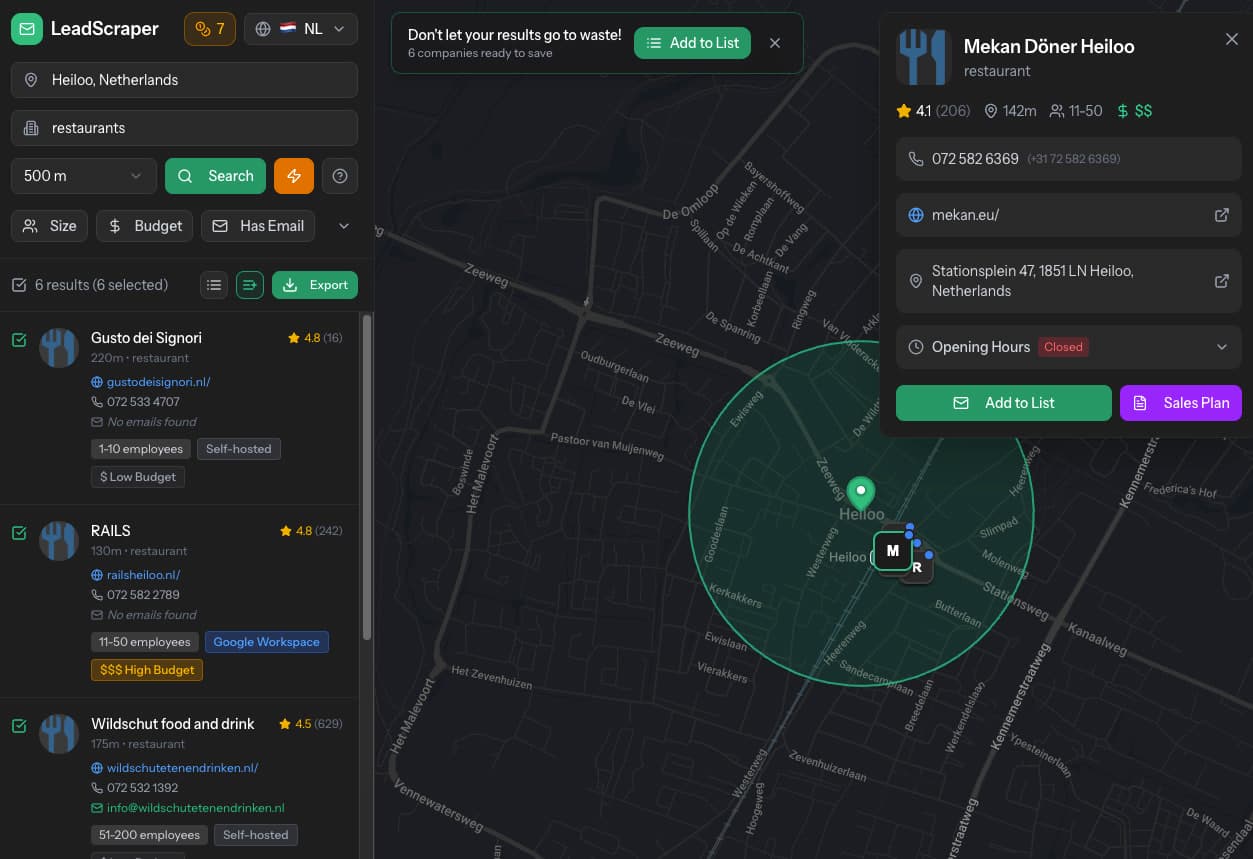
Why this matters: A restaurant using Google Workspace is more likely to pay for your marketing services than one using a free Gmail account. Budget scoring lets you prioritize high-value leads.
Social Media Profiles
The enrichment pipeline extracts links to:
- Facebook (business pages)
- Instagram (often the most active for local businesses)
- LinkedIn (company pages)
- Twitter/X
- YouTube
- TikTok
Social profiles enable multi-channel outreach. Email not getting responses? Try a LinkedIn connection request. Instagram DM. Facebook message.
AI Sales Intelligence: Your Personal Sales Strategist
Here's the feature that makes Email Lead Scraper unique.
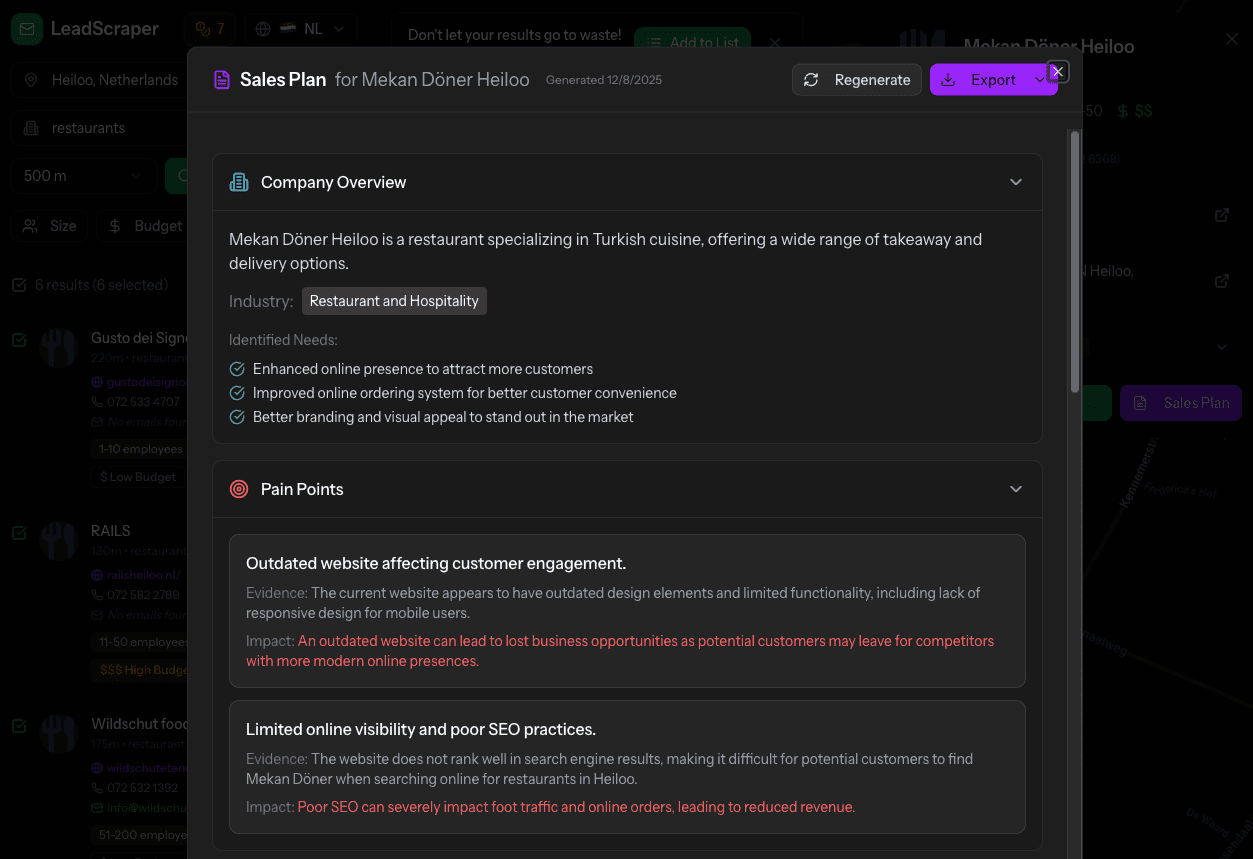
Click "Generate Sales Plan" and the platform:
- Scrapes the business website using Firecrawl's AI-powered extraction
- Analyzes the content — services offered, pricing signals, technology used, content quality
- Cross-references your service description (configured in settings)
- Generates a complete sales strategy with GPT-4o-mini
What You Get
Executive Summary A one-paragraph overview of the business and why they're a good fit for your services.
Pain Point Analysis Specific challenges identified from their website, with evidence:
- "Their menu is a PDF image — not searchable, not mobile-friendly"
- "No online booking system — customers must call during business hours"
- "Website loads in 6.2 seconds — 40% of visitors bounce before it finishes"
Service Matching How your specific services solve their problems:
- "Your web design service can convert their PDF menu to an interactive, SEO-friendly page"
- "Your booking integration adds 24/7 reservation capability"
- "Your performance optimization typically achieves 2-second load times"
Cold Email Template A personalized email ready to send:
- Subject line crafted for opens
- Opening that references something specific about their business
- Value proposition tied to their pain points
- Clear call-to-action
Phone Script For those who prefer calling:
- Opening line that gets past "not interested"
- Discovery questions to qualify the opportunity
- Objection handling suggestions
The Difference: Generic vs. Intelligent
Generic AI output:
"Dear Business Owner, I noticed you have a website. I can help you improve it. Let me know if you're interested."
Email Lead Scraper output:
"Hi Marco, I was checking out Trattoria Romano's website and noticed your beautiful menu photos are locked in a PDF. This means Google can't index your dishes — when someone searches 'best carbonara Amsterdam,' you're invisible. I help restaurants like yours turn PDF menus into searchable, mobile-friendly pages. One client saw a 34% increase in 'near me' searches within 3 months. Worth a 15-minute call to see if it makes sense for you?"
The difference is evidence. The AI doesn't make generic claims — it identifies specific problems on their website and connects them to specific solutions you offer.
Lead Organization: From Chaos to System
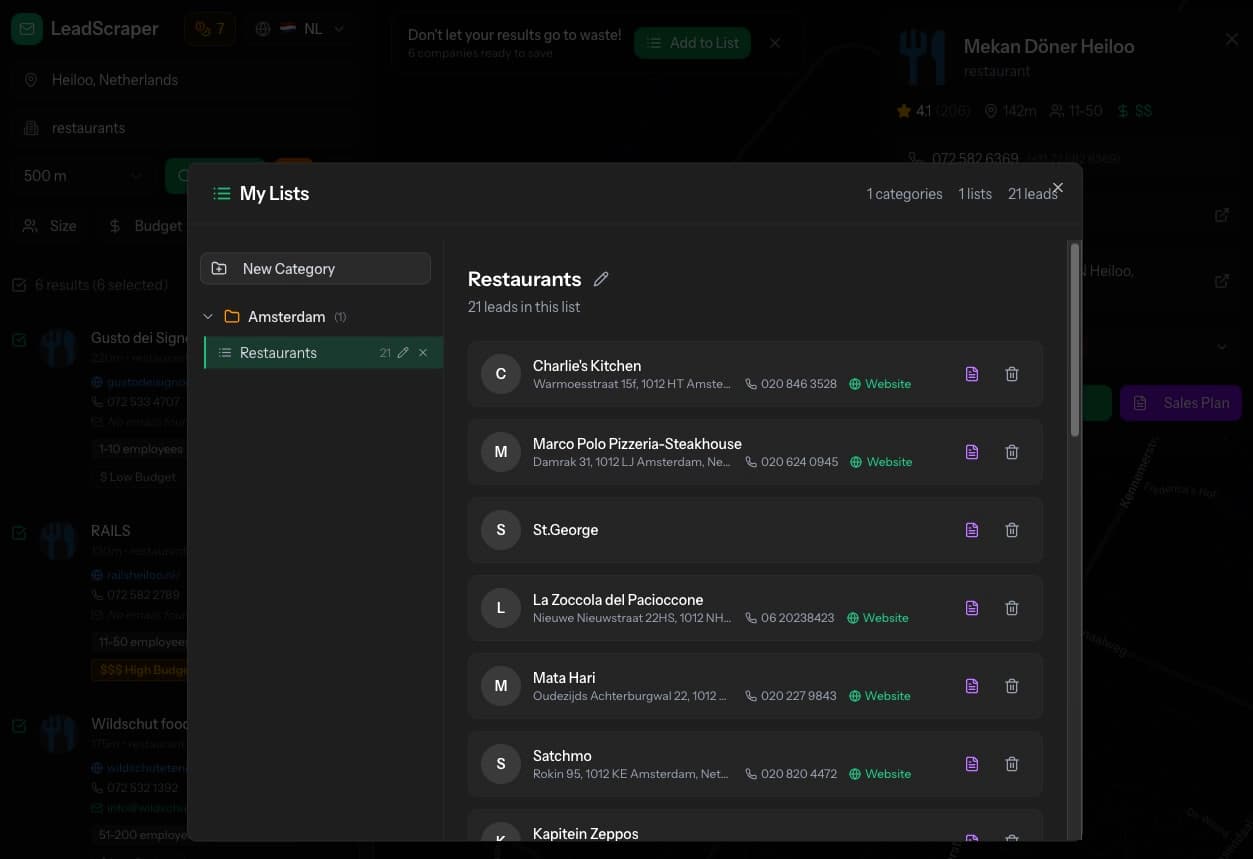
Prospecting without organization is chaos. You find 200 leads, enrich 50, email 20, and can't remember which is which.
Email Lead Scraper includes a complete lead management system:
Categories
Top-level organization for your prospecting:
- "Q1 2025 Campaign"
- "Restaurant Clients"
- "Amsterdam Leads"
- "Hot Prospects"
Lead Lists
Named lists within categories:
- "Restaurants - Italian"
- "Restaurants - Asian"
- "Contacted - Awaiting Reply"
- "Meeting Scheduled"
Bulk Actions
- Select multiple businesses from search results
- Add all to a list with one click
- Move between lists as deals progress
Visual Tracking
- Saved businesses show a bookmark icon
- See at a glance which leads you've already captured
- No duplicate saves, no confusion
Export: Take Your Data Anywhere
Your leads, your data. Export whenever you need to:
PDF Export
Professional, styled documents perfect for:
- Client presentations
- Team handoffs
- Printing for offline reference
Sales plans export with full formatting — pain points, email templates, everything in a clean PDF.
CSV Export
Structured data for:
- CRM import (HubSpot, Salesforce, Pipedrive)
- Spreadsheet analysis
- Mail merge campaigns
- Custom workflows
Columns include: business name, address, phone, email, website, rating, review count, budget score, social links.
The Credit System: Pay for Value
No subscriptions. No monthly fees. No paying for features you don't use.
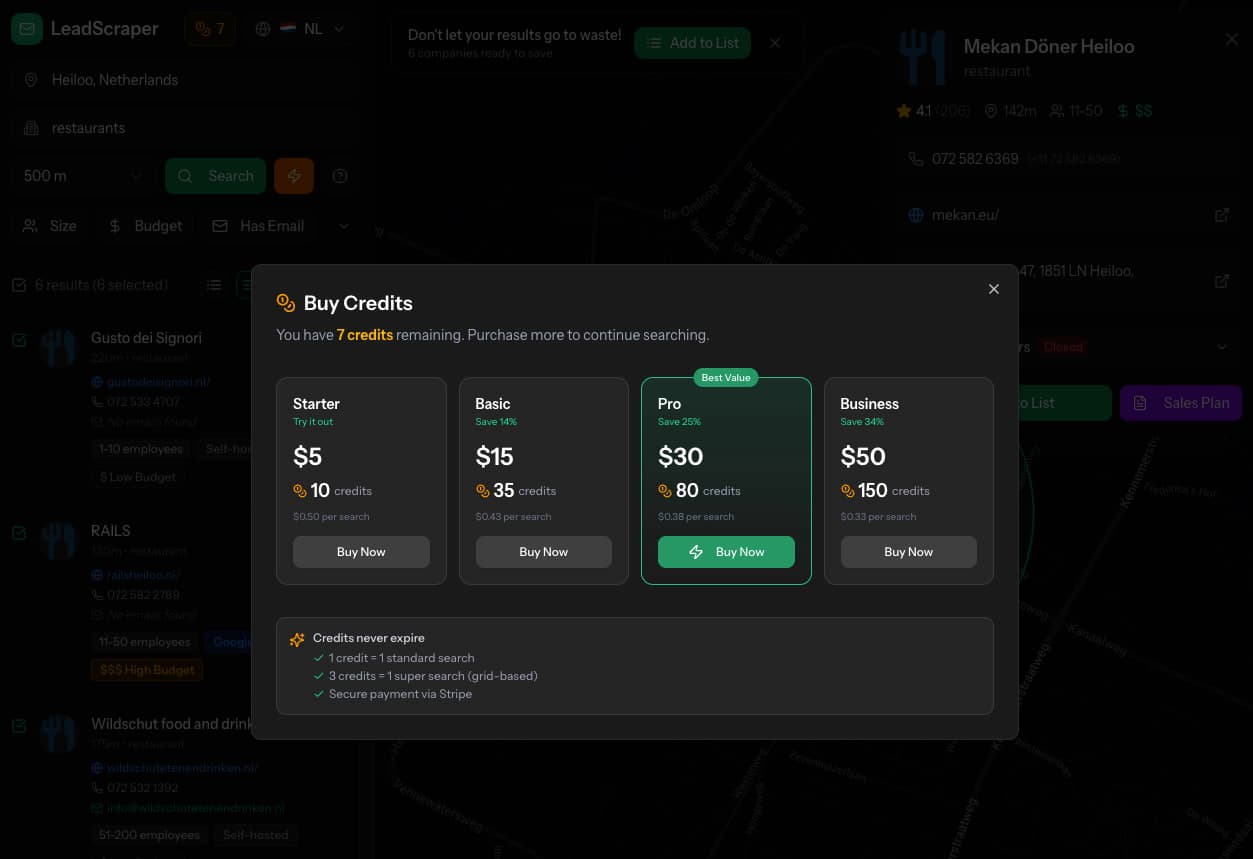
Email Lead Scraper uses a credit-based model:
| Action | Credits |
|---|---|
| Standard Search (up to 20 results) | 1 |
| Super Search (unlimited in radius) | 3 |
| Enrich a business | 1 |
| Generate Sales Plan | 2 |
Credit Packages:
| Package | Credits | Price | Per Credit |
|---|---|---|---|
| Starter | 50 | €9 | €0.18 |
| Professional | 200 | €29 | €0.145 |
| Agency | 500 | €59 | €0.118 |
| Enterprise | 2000 | €199 | €0.10 |
Buy credits when you need them. They never expire. Use them at your own pace.
Payment via Stripe Checkout — cards and iDEAL (Netherlands) supported.
Security: Built for Business
Your lead data is valuable. Email Lead Scraper protects it:
Two-Factor Authentication
TOTP-based 2FA compatible with:
- Google Authenticator
- Authy
- 1Password
- Any TOTP app
Recovery codes provided for backup access.
Secure Authentication
- Laravel Fortify handles auth
- Bcrypt password hashing
- Rate limiting on login attempts
- Email verification required
- Password reset with secure tokens
Data Privacy
- Your searches are yours alone
- No sharing between users
- GDPR-compliant data handling
- Delete your account and data anytime

Performance That Respects Your Time
A slow tool is a tool you don't use. Email Lead Scraper is optimized for speed:
| Metric | Score |
|---|---|
| Performance | 95+ |
| Accessibility | 100 |
| Best Practices | 100 |
| SEO | 100 |
How:
- React 19 with concurrent rendering
- Inertia.js for SPA-like navigation without full page reloads
- Tailwind CSS 4 with JIT compilation
- Lazy loading for map components
- SSE streaming for real-time updates (no polling)
- Database queries optimized with eager loading
The dashboard loads in under 2 seconds. Search results stream as they arrive. Enrichment runs concurrently.
The Technical Architecture
For the developers curious about how it all works:
Backend: Laravel 12
app/
├── Http/Controllers/
│   ├── ScraperController.php      # Search + enrichment logic
│   ├── SalesPlanController.php    # AI generation
│   ├── ListController.php         # Lead organization
│   └── StripeController.php       # Payment handling
├── Jobs/
│   ├── EnrichCompany.php          # Single enrichment
│   └── EnrichCompanies.php        # Batch via Outscraper
├── Services/
│   ├── WebsiteScraper.php         # Email extraction
│   ├── FirecrawlService.php       # AI website analysis
│   └── OpenAIService.php          # GPT integration
└── Models/
    ├── Company.php                # Business data
    ├── SalesPlan.php              # Generated plans
    └── LeadList.php               # Organization
Frontend: React 19 + TypeScript
resources/js/
├── pages/
│   ├── dashboard.tsx              # Main application
│   └── settings/                  # User preferences
├── components/
│   ├── company-card.tsx           # Business display
│   ├── map-view.tsx               # Google Maps
│   ├── sales-plan-modal.tsx       # AI plan display
│   └── buy-credits-modal.tsx      # Stripe checkout
└── hooks/
    ├── use-search.ts              # Search state
    └── use-enrichment.ts          # Enrichment progress
External Services
| Service | Purpose |
|---|---|
| Google Places API | Business search + details |
| Google Maps API | Interactive mapping |
| OpenAI GPT-4o-mini | Sales plan generation |
| Firecrawl | Website content extraction |
| Outscraper | Batch contact enrichment |
| Stripe | Payment processing |
Who This Is For
| Client Type | Use Case |
|---|---|
| Digital Marketing Agencies | Find local businesses needing SEO, web design, advertising |
| B2B SaaS Companies | Identify SMBs for software demos and free trials |
| Business Consultants | Build prospect lists for accounting, legal, HR services |
| Sales Development Teams | Generate qualified leads with verified contact data |
| Freelancers | Find local clients for design, development, marketing |
| Real Estate Professionals | Locate commercial property prospects by business type |
| Recruitment Agencies | Find companies to pitch staffing services |
What I Learned Building This
Email Lead Scraper is my most complex project to date. Some lessons from 6 months of development:
Data Quality Is Everything
The first version of email extraction had a 60% false positive rate. noreply@, info@example.com, WordPress default emails — garbage data that would embarrass anyone who used it.
Three iterations of regex refinement, blocklist management, and provider-specific filtering got accuracy to 95%+. The lesson: users don't care how clever your algorithm is. They care if the data is correct.
Breaking API Limits Requires Creativity
The Super Search algorithm was born from frustration. Watching Google Places return 20 results for "restaurants in Amsterdam" — knowing there are hundreds — felt like a product failure.
The grid-based approach took a week to design and implement. Haversine formula for cell positioning. SSE for real-time streaming. Deduplication that handles edge cases. But it transformed the product from "useful" to "essential."
AI Needs Constraints
GPT-4o-mini generates fluent text easily. Generating relevant text required careful prompt engineering:
- Structured website data as input, not raw HTML
- Explicit output format with sections and evidence requirements
- Temperature tuning for consistency
- Few-shot examples of good vs. bad output
The difference between "AI-generated" and "AI-assisted" is in the constraints you impose.
Credits Beat Subscriptions
For a tool people use episodically — run a campaign, take a break, run another campaign — subscriptions create churn anxiety. "Am I getting my money's worth this month?"
Pay-per-use aligns cost with value. You pay when you get leads, not when you don't. Users buy more credits because they've already seen the ROI.
Ready to stop wasting time on manual prospecting?